+1 888.250.2082Login | Signup
The Connector - Microsoft Project to Atlassian JIRA Integration

The Connector 1.3 - Microsoft Project to Atlassian JIRA Integration

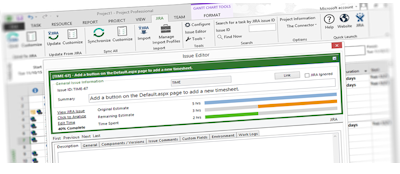
The Connector is a Microsoft Project extension plug-in that will allow connection directly from Microsoft Project to Atlassian JIRA. Create a project plan using Microsoft Project and directly import tasks from JIRA. Use JIRA for task management and quickly and easily sync between the two systems. The Connector provides direct integration with Microsoft Project creating a JIRA toolbar right in Project. From this toolbar, you have access to a variety of JIRA functionality like importing, updating resource assignments, due dates and task descriptions.

Our Customers

The Connector is used by a growing number of JIRA users all around the globe. Our customers range from small organizations and non-profits to acedemic institutions and Fortune 500 companies.

Download Free 30 Day Trial

A trial version of The Connector is available for download.
System Requirements
  • Microsoft Project 2003 or 2007
  • Microsoft .NET 3.0 Installed
  • Atlassian JIRA 3.6 or greater

From the downloads page, there are links to download and install Microsoft .NET 3.0, The Connector User Manual, and custom web services.

Need Customizations?

If you need customizations to the plug-in for specific functionality, Ecliptic Technologies, Inc. is a custom software provider that can handle this. Contact our sales department with questions at sales@ecliptictech.com

Announcements

11/04/2009 - Version 1.3 Build 3959 Released
A new build of The Connector 1.3 has been released. The new build adds support for JIRA 4 as well as some small bug fixes and enhancements. View the release notes.

Using The Connector with JIRA 4

09/07/2009 - Version 1.3 Now Available!
Version 1.3 of The Connector is now available for download and purchase. The latest version adds support for issue linking and dependencies and worklog detail imported from JIRA. View the details on the new release.

09/07/2009 - New Website Launched
Ecliptic Tehnologies launches a new website for The Connector. The new website allows access to your product keys and a new product key renewal process.

Demonstration Videos

We've posted some demonstration videos of The Connector in action. They show some of the functionality that is available with the product.

NOTE: These videos require a Flash plug-in to play.

Creating Issues (click to view)

This demonstration video will explain how to use The Connector to create JIRA issues from tasks that are in Microsoft Project.

Conditional Importing (click to view)

This demonstration video will show the conditional importing ability of The Connector allowing you more control over the issues you import into Microsoft Project.

Using the Issue Editor (click to view)

The issue editor dialog allows modification of much of JIRA's issue properties right from within Microsoft Project. Changes can be made in Project and updated to JIRA when desired.

Updating From JIRA (click to view)

This demonstration video will explain how to use The Connector to update your Microsoft Project task list using the built in mapping statuses. As JIRA issues get resolved and closed, your project plan gets updated to reflect those changes.

Additional videos »