The Connector - Microsoft Project to Atlassian JIRA Integration
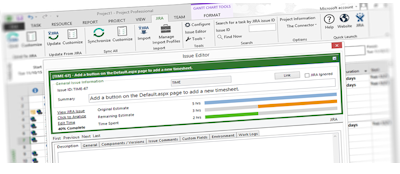
The Connector is a Microsoft Project extension plug-in that will allow connection directly from Microsoft Project to Atlassian JIRA. Create a project plan using Microsoft Project and directly import tasks from JIRA. Use JIRA for task management and quickly and easily sync between the two systems. The Connector provides direct integration with Microsoft Project creating a JIRA toolbar right in Project. From this toolbar, you have access to a variety of JIRA functionality like importing, updating resource assignments, due dates and task descriptions.
The Connector is used by a growing number of JIRA users all around the globe. Our customers range from
small organizations and non-profits to acedemic institutions and Fortune 500 companies.

If you need customizations to the plug-in for specific functionality, Ecliptic Technologies, Inc. is a custom software provider that can handle this. Contact our sales department with questions at sales@ecliptictech.com
A trial version of The Connector is available for download.
System Requirements
- Microsoft Project 2003, 2007, 2010, 2013, 2016 or 2019
- Microsoft .NET 4.0 Installed
- Atlassian JIRA 5 or greater
From the downloads page, there are links to download and install Microsoft .NET 4.0, The Connector User Manual, and custom web services.